
Instagram comment-to-DM automation.
Someone comments “I WANT IT” on your post. levios sends your link in a DM, so you can continue the conversation with someone who is interested.
- with a simple setup
- with automatic delivery
- in under a minute
They showed interest. Keep the conversation going.
With Instagram comment-to-DM automation, interest in your post becomes a direct path to your offer.
Send the link without copy and paste.
levios replies to eligible comments with the message you prepared. Your audience gets the link to your class, resource or product in a DM.
Forgot to switch it on? Recover missed comments.
Recover eligible comments from the last 7 days on a post or Reel, without sending the DM again to someone who already received it.
More interested people. No contact-based fees.
Grow your contact list without increasing your monthly bill per contact. Pro is billed per Instagram account.
Automating is as simple as writing one sentence.
Create an automation by completing one sentence. No complex flowchart or chatbot setup to learn:
When someone comments LINK on your post, send this DM and save the contact.
On other tools
- Build complex flowcharts
- Connect one box after another
- Learn the flow builder before you start
- Reconfigure the flow for each change
On levios
Keep it simple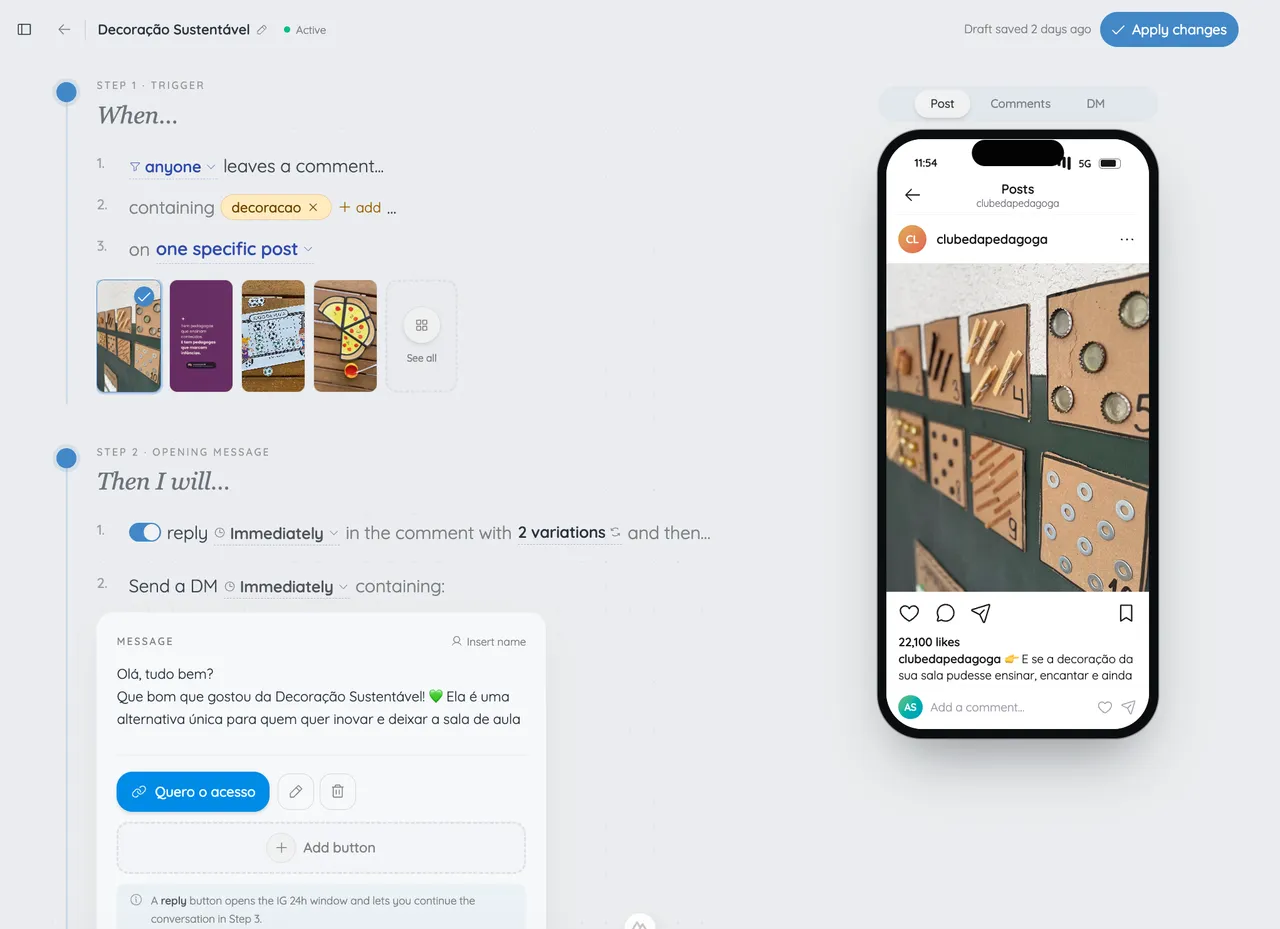
- Automate the way you write a post caption.
- See each change in the live preview
- Activate it
- Send the promised DMs from that post
If you can write an Instagram caption, you can create an automation in levios.
How to set up Instagram comment-to-DM automation.
- 01
Connect your Instagram
9:41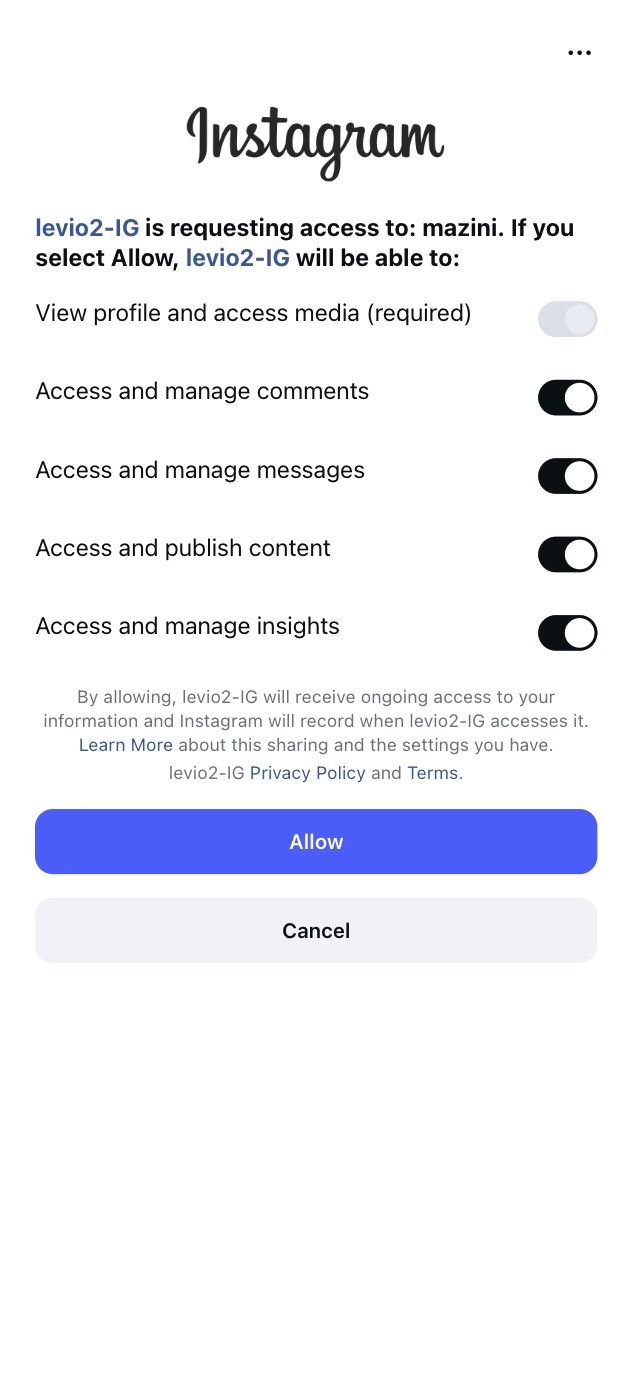
A professional or creator account, in a few clicks.
- 02
Pick the post and the word
9:41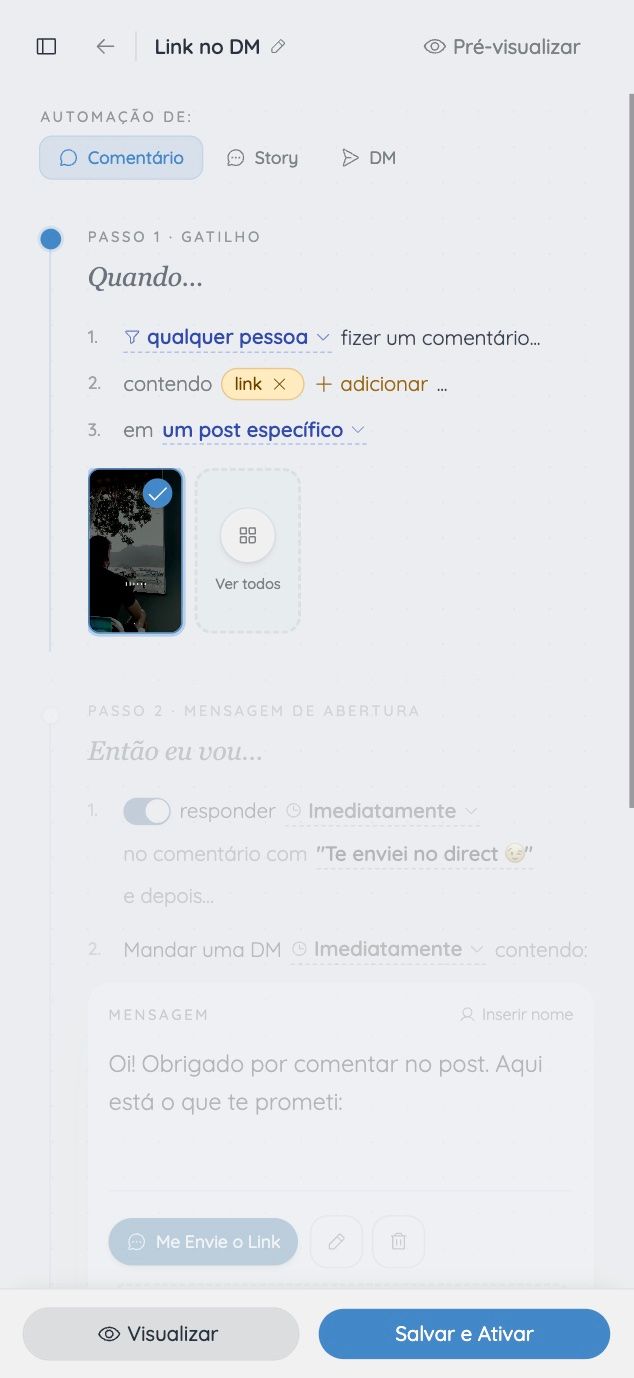
LINK, an emoji, the class number, or any word.
- 03
Write the DM
9:41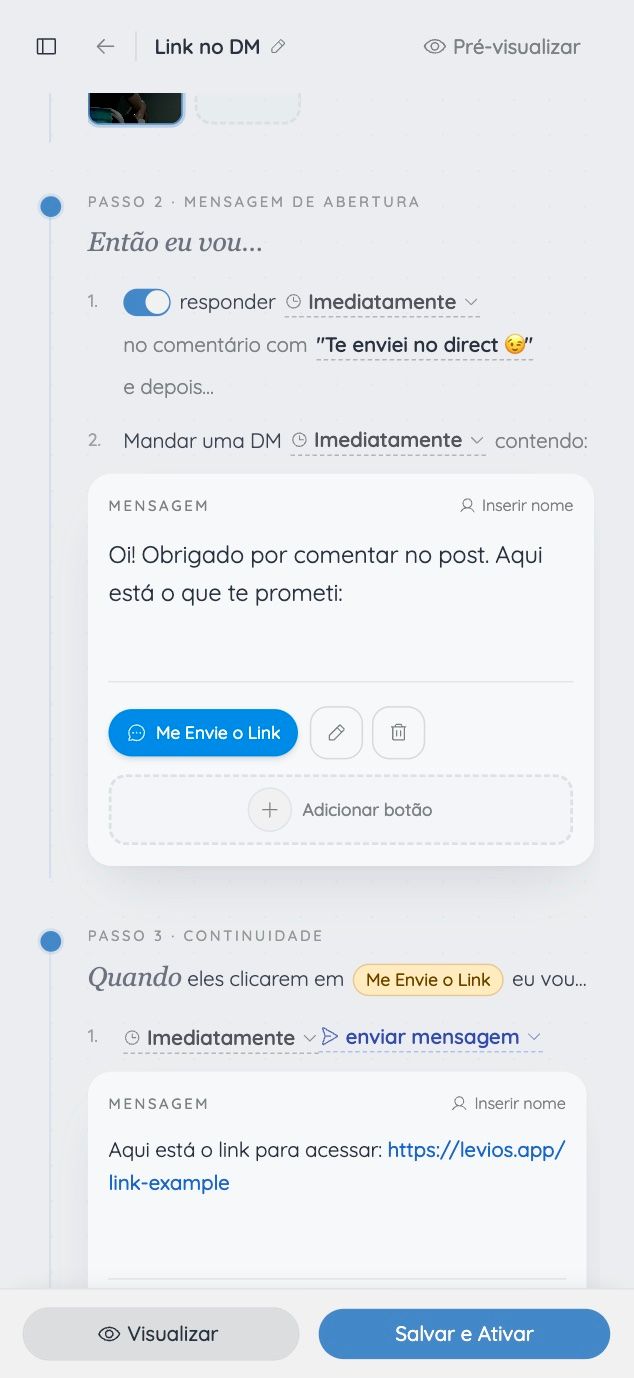
Link, coupon, class, PDF: whatever you promised.
- 04
Preview and activate
9:41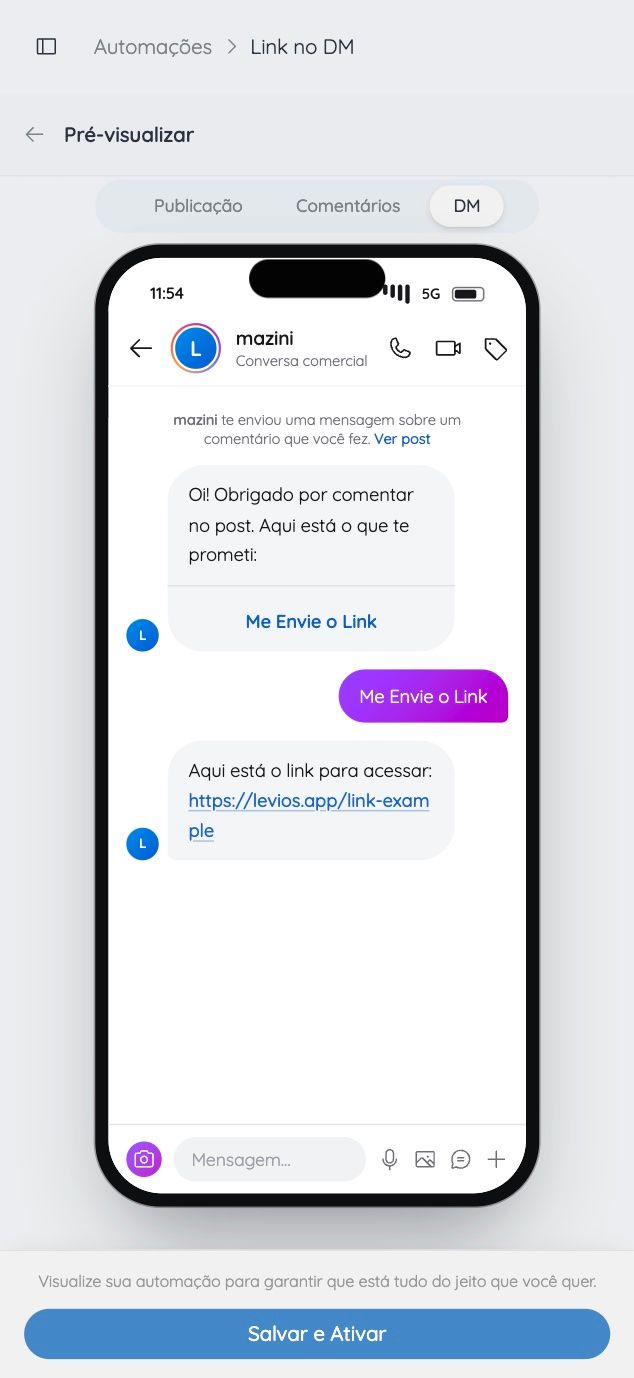
Preview the DM, then activate it. levios delivers each message for you.
- 01
Connect your Instagram
9:41A professional or creator account, in a few clicks.
- 02
Pick the post and the word
9:41LINK, an emoji, the class number, or any word.
- 03
Write the DM
9:41Link, coupon, class, PDF: whatever you promised.
- 04
Preview and activate
9:41Preview the DM, then activate it. levios delivers each message for you.
One feature. Different reasons to comment.
A checklist, a class or an offer: explore examples of what your comment-to-DM automation can deliver.
Deliver your free resource.
Send a checklist, guide or file link to people who asked in the comments. The resource arrives in their DMs, where the conversation can continue.
“RESOURCE”Bring more people to your class.
Share a registration or class access link with people who showed interest in your post or Reel.
“CLASS”Share your offer.
Send the product page, catalogue or coupon in a DM. People find what they asked for without hunting for the link in your bio.
“I WANT IT”
Keep your Instagram account safe.
Official API
levios uses Instagram's official API. We never ask for or use your password.
Within Meta's rules
We follow Meta’s messaging window and sending limits.
No password-sharing shortcuts
levios works through Instagram’s official API instead of logging into your account.
Transparent
Check the preview before activation and track the status of each send.
levios uses Instagram’s official API and follows Meta’s messaging rules.
Questions about comment-to-DM.
How does comment-to-DM automation work?
Do I need to build flowcharts?
Does it work with posts, Reels and carousels?
Can I reply to comments made before activation?
Which Instagram account can I connect?
Can I keep sending messages after the first DM?
Can I start for free?
Start your Instagram comment-to-DM automation.
Turn the next “I WANT IT” into a conversation about your offer. Write your message and let levios deliver your link in a DM.
Create My Free AutomationNo credit card required.
How it works and Instagram requirements
An eligible comment on the configured Instagram post or Reel can trigger an optional public acknowledgement and one configured private reply; the levios builder keeps the trigger, messages, and preview in one flow.
- The connected Instagram account must be a professional Business or Creator account and authorize the required Instagram permissions.
- A private reply is limited by Meta's comment-to-message rules; further automated messages require the recipient to respond and remain inside the applicable messaging window.
- The selected post, comment, permissions, and account connection must remain eligible when the event is processed.
- Instagram Login does not provide access to ads or tagging through this integration.
- Platform delivery can fail or be delayed, so activation and event status must be checked instead of treating delivery as guaranteed.
What the feature does
Instagram comment-to-DM turns a clear public action into a configured private reply. A creator selects an eligible post or Reel, defines which comment should count, writes an optional public acknowledgement, and prepares the first Direct message. When an eligible comment arrives, levios processes that event and attempts the configured actions.
This is useful when the post already contains a specific promise: receive a checklist, see a registration page, ask for product details, or continue a conversation privately. The automation carries that promise from the comment into Direct. It does not decide what should be promised, write an accurate resource, or guarantee that the person will respond.
The levios builder places the trigger, public reply, first message, and phone preview in the same guided flow. That makes the sequence inspectable before activation. It also lets the creator keep the language of the post and the language of the DM aligned.
How the conversation starts
The public comment and private reply are different actions. A public acknowledgement can tell the commenter to check Direct without exposing the resource or personal context in the thread. The private reply can then identify the requested item and explain the next action.
Meta documents a specific limit for private replies to comments: one private reply can be sent within seven days of the comment. Sending additional automated messages depends on the recipient replying, after which messaging is subject to the applicable 24-hour window. A first DM should therefore state any required response plainly. It should not imply that an automatic second message is inevitable when the person has not interacted.
For example, a first message may say that the guide is ready and ask the recipient to reply with a named word to receive its link. This is sample flow design, not a customer result or a way around platform policy.
What must be connected
The Instagram account must be a professional Business or Creator account. The owner connects it through Instagram authorization and grants the permissions needed to identify the account, manage comments, and manage messages.
The connection must remain valid after setup. A removed permission, disconnected account, deleted post, ineligible comment, or platform error can prevent an action. The status shown by the product is the useful source for investigating a specific attempt.
Instagram Login has its own boundary: Meta’s documentation says this setup does not access Instagram ads or tagging. Those capabilities should not be inferred from comment and messaging permissions.
Design the trigger narrowly
Choose a condition that matches the call to action in the post. If the caption asks people to comment GUIDE, test that word and also test an unrelated comment. A trigger broad enough to match ordinary conversation can send unwanted DMs; one that differs from the caption can miss legitimate requests.
Before activating, check the selected post, the exact trigger, the public reply, the first DM, and the preview as a single path. Then use a second Instagram account for an end-to-end test. The setup guide covers those steps, while the resource-delivery example shows how to write a concrete promise and message sequence.
Post
studio.aurora
Comment
LINKand the link lands in your DMs 👇
Liked by mariana.luz and 2,847 others
studio.aurora Fresh out of the oven 🔥 comment LINK
LINKAdd a comment…