
Deliver your Instagram lead magnet automatically by DM.
Send PDFs, ebooks, videos, lessons or other free resources through Instagram Direct when someone:
- Comments on your posts, carousels or Reels
- Replies or reacts to your stories
- Sends you a specific keyword by DM
Capture contacts and leads by sharing free resources.
Here is an example for people who comment on your posts, carousels and Reels:
Comments on posts, carousels and Reels
Ask people to comment CHECKLIST.
CHECKLIST
Story replies and reactions
Invite your audience to reply LESSON.
Keywords in Direct
Ask them to send TEMPLATE by DM.
Set up your delivery like writing a sentence.
With your resource ready, set up your automation in 1 minute: choose the trigger, write the message and check the preview.
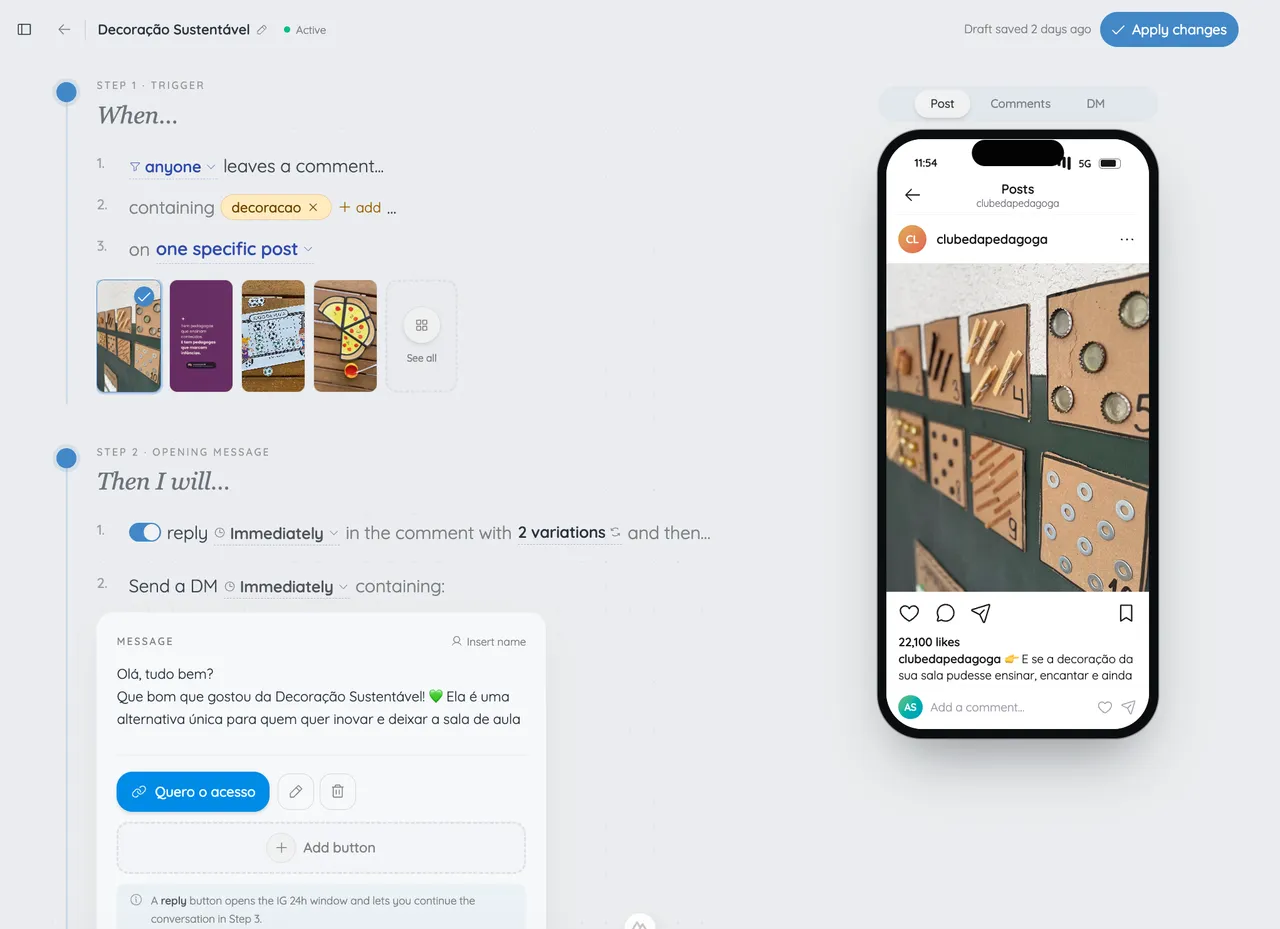
- 1Choose the post, story or DM keyword.
- 2Write the message and add your resource link.
- 3Check the preview and activate your automation.
What could your next post deliver?
Choose a resource that solves a specific problem for your audience.
A useful checklist
Break a task into steps your audience can put into practice today.
“CHECKLIST”A free lesson
Take interest in your Reel to the link for your lesson or demo.
“LESSON”A template to get started
Share access to the spreadsheet, script or template you prepared.
“TEMPLATE”
Go beyond delivering a resource by Instagram DM.
Use interest in your content to get to know your leads and keep the relationship going.
Capture email and phone numbers
Ask for lead details before delivering your resource. Save their answers in the contact record for your next campaign.
Ask them to follow
Add a request to follow your profile before releasing the content and introduce new visitors to your work.
Organize by interest
Use tags to identify who requested a lesson, checklist or template. Find these contacts and export your selection when needed.
Questions about sharing content and capturing leads
Can I deliver a different resource for each post?
Does it work with stories and DM requests?
Can I ask for email and phone details before delivery?
Can I ask people to follow my profile?
Can I recover requests on a post I already published?
Do I need to build a flowchart?
Where can I find the leads I collected?
Can I start for free?
Start delivering resources by Instagram DM.
You handle publishing. levios automates the rest.
Start FreeFree to start. No card required.
More about this use case
Start with a promise people can verify
Imagine a creator publishing a Reel about planning a product launch. The caption promises a one-page checklist and says: “Comment CHECKLIST and I’ll send it in Direct.” That sentence tells the reader what they will receive, how to request it, and where the next step happens.
The automation should preserve that clarity. It is not a substitute for a useful resource or a truthful caption. Its job is to recognize an eligible request and carry the promise into a private conversation without making the person guess what happened.
In levios, the creator chooses the relevant post or Reel, defines the comment trigger, writes an optional public reply, configures the first DM, and checks the phone preview. The reviewed product flow can also save the contact created by the interaction.
A simple message sequence
The public reply can be short and contextual:
Example public reply: “I sent you the next step in Direct.”
The initial private reply should identify the resource and explain any action needed before another automated message can be sent:
Example first DM: “I have the launch checklist ready. Reply CHECKLIST here and I’ll send the access link.”
After the person replies, the follow-up can deliver the promised destination:
Example follow-up: “Here is the checklist: [your reviewed link]. Save it before planning your next launch.”
These are examples, not proof of a customer outcome. Replace the placeholder with a destination you control, verify that it works on mobile, and make sure the page matches the promise in the post.
Meta’s current Instagram API documentation distinguishes a private reply to a comment from an open messaging conversation. It documents one private reply to the commenter; follow-up messages depend on the recipient responding and then fall within the applicable messaging window. That is why the first DM should not conceal a required response.
What to test before publishing
Use a second Instagram account and follow the same path a visitor will take. Comment the exact keyword on the selected post. Confirm whether the public acknowledgement appears, whether the first DM reaches the correct inbox or request folder, and whether its instructions are understandable without the original caption open.
Then perform the requested interaction and confirm that the resource link arrives. Check the link, the resource title, access permissions, and mobile layout. Also test a comment that should not match, so a broad trigger does not turn unrelated discussion into an unsolicited DM.
Watch the operational status rather than assuming every platform call succeeds. A deleted comment, changed permission, disconnected professional account, duplicate event, or platform error can interrupt delivery. The useful response is a visible status and a fix, not a claim of guaranteed delivery.
Keep the use case narrow
One post can promise one concrete resource to one recognizable audience. If a caption offers several unrelated downloads, the trigger and first message become harder to understand. Separate those promises into different posts or explicit keywords.
A good resource-delivery automation feels like a continuation of the post: the public call to action, private message, and destination all say the same thing. That consistency is more valuable than adding branches before the basic path has been tested.
Post
studio.aurora
Comment
LINKand the link lands in your DMs 👇
Liked by mariana.luz and 2,847 others
studio.aurora Fresh out of the oven 🔥 comment LINK
LINKAdd a comment…