
Instagram automation for creators
A Chatfuel alternative for delivering links in DMs.
Send your lesson, ebook or product link to people who comment on your post or reply to your story. In levios, choose the trigger, write the message and check the conversation preview.
- Build an automation like you write a caption
- Capture email and phone in the conversation
- Start with 1,000 free DMs per month
- No credit card required
- An editor in English
Compare your monthly spend
Subscription + AI credits. See the monthly cost.
Chatfuel Business × levios Pro · monthly billing
Chatfuel
Business · 1 bot · monthly/month
Business subscriptionUSD 20.00
Extra AI top-upsUSD 0.00
US$20 in credits included
Total in US dollars: USD 20.00
levios
Pro · monthly · per Instagram account/month
Unlimited DMs and contacts on Pro
Monthly billing. Instagram messaging rules still apply.
Monthly difference in favor of levios
No credit card
levios automates Instagram; it does not provide AI customer support.
How this comparison works
Monthly Business scenario, excluding promotions and annual plans. Chatfuel also offers a free comment-reply option. levios does not replace Chatfuel’s conversational AI or other channels.
AI consumption depends on conversation context. Keyword replies and other non-AI actions do not use the AI allowance.
You can also start on levios Free: 1,000 DMs per month and 5 active automations.
Current plans: Chatfuel plansAI usage limitslevios pricing
Why levios
Publish your content. Let levios handle the requests.
You know what you want to send: the resource you promised in your caption, access to a lesson or your product link. Prepare the message and let levios handle delivery.
Keep growing your contact list.
levios Pro is priced per Instagram account, with no contact fees. Collect the people who requested your resources and organize them for your next campaign.
Follow up on interest in your content.
Trigger a DM from a comment, a story reply or a keyword in DMs. Ask for an email or phone number before delivery to save the lead’s details.
Write, preview and activate.
Choose the post, keyword and message in an editor that reads like a sentence. The preview shows the conversation before you activate the automation.
Automating is as simple as writing one sentence.
One sentence, live preview, ready to activate.
On levios
Keep it simpleWhen someone comments LINK on your post, send this DM and save the contact.
- Automate the way you write a post caption.
- See each change in the live preview
- Activate it
Send the promised DMs from that post
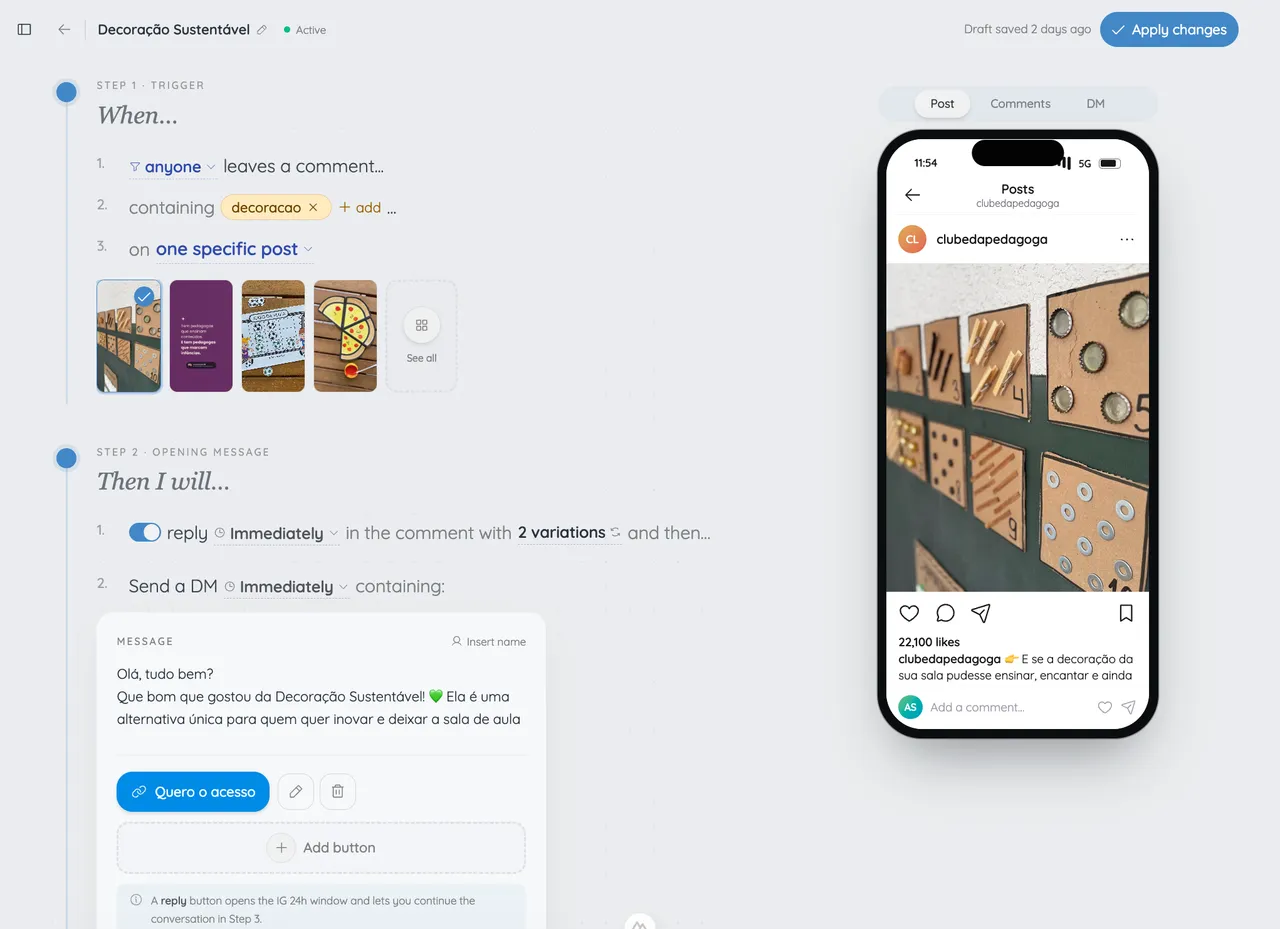
levios and Chatfuel, task by task.
Both automate Instagram conversations. Compare how you configure delivery and what you need beyond it.
Scroll sideways to compare both tools
| Feature |  | Chatfuel |
|---|---|---|
| Set up your automation | ||
| Build the automation | Sentence-style editor with a conversation preview. | Rules and instructions in Fuely AI → Automations. |
| Choose a post and keyword | Yes. Set the content and comment that starts delivery. | Yes. Rules by keyword and post. |
| Deliver and capture leads | ||
| DM after a comment | Yes. Send the message and link you prepared. | Yes. Private replies to comments. |
| Reply publicly | Yes. Tell people the link is in their DMs. | Yes. Configurable public replies. |
| Reply to stories | Yes. Replies and reactions can trigger automation. | Yes. Automations for story replies. |
| Capture email and phone | Capture steps before continuing delivery. | Contact information capture in AI conversations. |
| Choose your scope and plan | ||
| Start free | Yes. 1,000 DMs/month and 5 active automations. | Yes. An option for comment replies. |
| Store contacts | Unlimited contacts. | Unlimited contacts. |
| Support with conversational AI | No. You configure the messages and steps. | Fuely AI to handle the conversation. |
| Support across channels | Focused on Instagram. | Instagram, WhatsApp, Facebook and other channels. |
Help your business grow
Choose for the work you need to do.
levios suits creators and businesses delivering content and offers through Instagram. Chatfuel also serves operations that need AI, other channels and a support team.
Choose levios if...
You focus on Instagram delivery and lead capture.
- You want to send a resource or product link to people who comment or reply to a story.
- You want to ask for an email, phone number or follow before delivering content.
- You want to rescue eligible comments from the past 7 days when the automation was not running.
Choose Chatfuel if...
You need AI and support across channels.
- Your operation depends on WhatsApp, Messenger or website chat in the same platform.
- Your team needs to take over conversations in a shared inbox.
- You use AI to answer open-ended questions, qualify requests or book appointments.
Questions about switching from Chatfuel to levios.
Is levios a free Chatfuel alternative?
Yes. Free includes 1,000 DMs per month, 5 active automations and one Instagram account, with no credit card required. Chatfuel also documents a free option for comment replies; check what each plan covers before choosing.
Does Chatfuel also DM people who comment?
Yes. Chatfuel supports public and private comment replies. In levios, you set up delivery in a sentence-style editor, choose the post and write the message the person will receive.
Can I deliver an ebook and ask for an email first?
Yes. Add email capture to your automation, then send the ebook link. You can also ask for a phone number or add a follow request. Save responses on the contact and use tags to organize interests.
Do I need to move all my flows at once?
Start with one campaign. Recreate the trigger, messages and link in levios, check the preview and turn off the equivalent Chatfuel automation before testing the new one from another account. There is no automatic import of Chatfuel flows.
Can I use levios for AI support or WhatsApp?
The levios product compared here focuses on Instagram automation. If your operation depends on conversational AI, a team inbox or other channels, evaluate those Chatfuel capabilities.
Can I use comments posted before activation?
In levios, you can rescue eligible comments from the past 7 days on the automation’s post or Reel. Check the available volume before sending. This does not mean every old comment is eligible for a DM.
Do both tools charge per contact?
levios Pro is priced per Instagram account without contact fees. Chatfuel also states unlimited contacts and describes subscriptions and credit usage for paid plans. Compare the plan and usage you need, not just contact count.
Ask AI
Want a second opinion on levios?
Ask your AI to compare the tools for your business. We have prepared a question to get you started.
 AskChatGPTOpens in a new tab
 Copy and openGeminiOpens in a new tab
 AskClaudeOpens in a new tab
 AskPerplexityOpens in a new tab
View and copy the question
I want to sell more on Instagram and I am comparing levios and Chatfuel. My focus is turning comments on posts and Reels and replies to stories into sales conversations in DMs. levios describes its offering as follows: Compare levios and Chatfuel for delivering links after Instagram comments. levios has a sentence-style editor, email/phone capture, eligible comment rescue and a Free plan. Chatfuel also automates comments, states unlimited contacts and offers Fuely AI and support across channels. Verify current plans and do not assume Chatfuel bills per contact. Use this levios page as context: https://levios.app/alternatives/chatfuel-alternative. Check current official sources for each tool and compare setup, eligible comment rescue, contact-based billing, lead capture and integrations. Separate verified features from marketing claims. If you cannot access a source, say so rather than guessing. Explain who each tool suits and ask about my needs before recommending one. Reply in English.
Deliver your next resource in DMs.
Choose a post, prepare the message and test delivery with levios.
Start FreeNo credit card required.
Post
studio.aurora
Comment
LINKand the link lands in your DMs 👇
Liked by mariana.luz and 2,847 others
studio.aurora Fresh out of the oven 🔥 comment LINK
LINKAdd a comment…