
A practical Instagram guide
How to set up automatic messages on Instagram
Welcome people to your DMs with suggested questions, a greeting and your business hours. Set it up in levios and test the preview before activating.
Hi! I'd like to know more about your classes.
Hi! We received your message. Which class are you interested in? Let us know so we can help you here.
Who do you want to reply to?
The direct answer
In levios, open the account Settings and select Direct reception. Enable Ice breakers, Welcome or Away, write your replies and test the preview. Then choose Save configuration, review and confirm with Activate reception. Save draft keeps your text without activating messages.
How to set up ice breakers
In levios, select the account with your connected Instagram and open Settings → Direct reception. Prepare your questions, greeting and away message here, without opening an external manager.
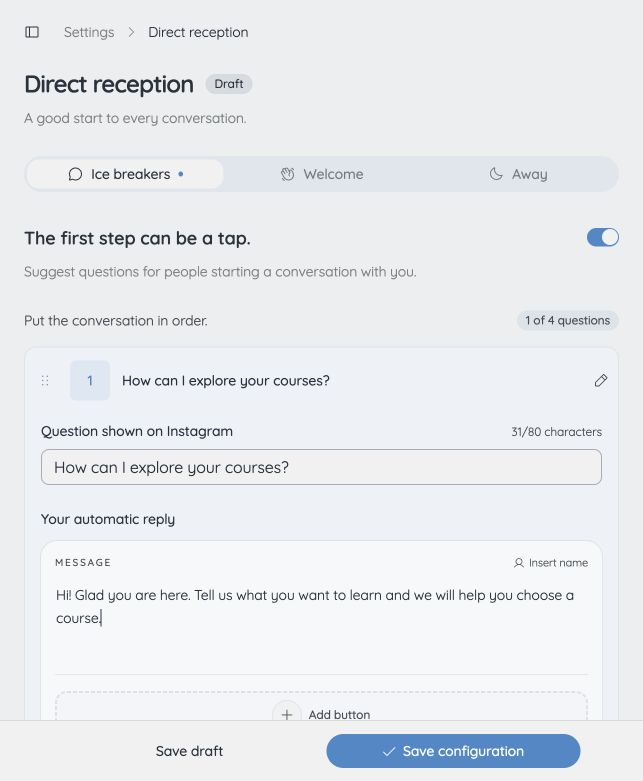
- Open Ice breakers and turn on Enable ice breakers.
- Add a question. Write the question shown on Instagram and the automatic reply people receive when they tap it.
- Add up to four questions and arrange them in a helpful order. For example: “I want to explore your courses” or “How can I contact you?”.
- Test the question in the preview. You can include link buttons for a catalog, resource or product page.
- Choose Save configuration, review and confirm with Activate reception. If reception is already configured, confirm with Save changes. Wait for Instagram confirmation.
Questions appear before the first message. A tap triggers the answer; visiting the profile alone does not. If different questions already exist on Instagram, review their replacement before confirming.
How to set up a welcome message
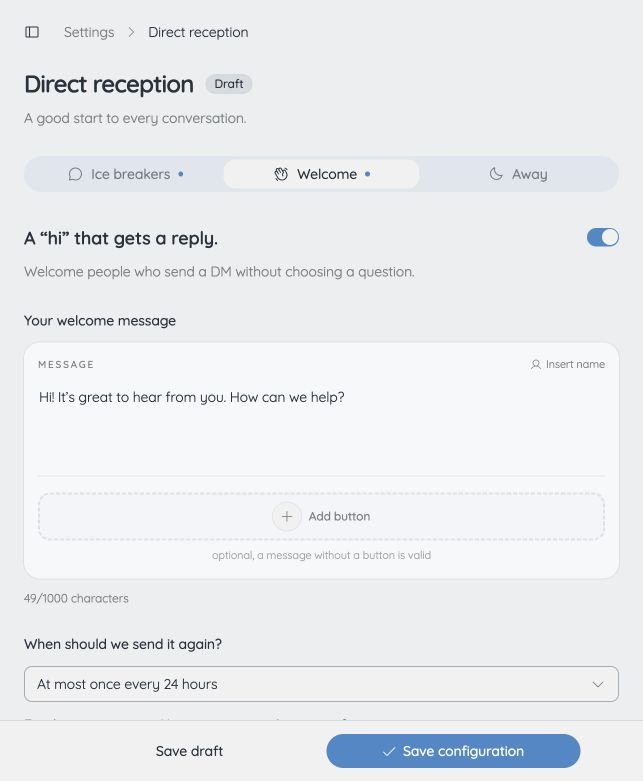
In Direct reception, open Welcome. This message greets people who write a DM without selecting an ice breaker.
- Enable welcome messages and write a short greeting that asks what the person needs.
- Choose whether to send it again at most once every 24 hours or 7 days to the same person.
- Send a test “hello” in the preview. Preview tests do not send any real messages.
- Choose Save configuration, review and confirm activation or changes.
The greeting does not repeat for every message. If an ice breaker or a specific automation already answered the interaction, the welcome message stays silent.
How to set up an away message
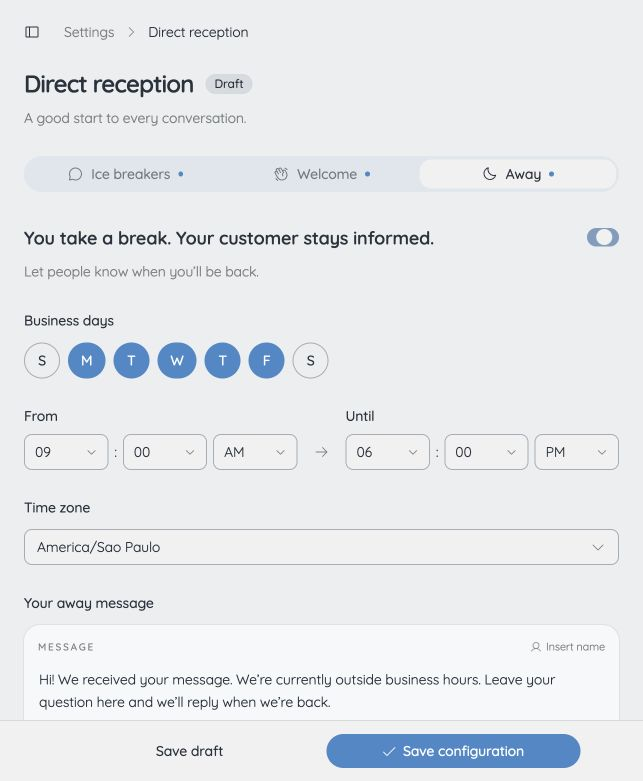
Open Away in Direct reception to let people know when you are unavailable.
- Enable the away message.
- Select your working days, opening and closing times, and business time zone.
- Write the away message. levios appends your configured hours automatically, so you do not need to repeat them in the text.
- Check the in-hours and out-of-hours scenarios in the preview.
- Choose Save configuration, review and confirm. Save draft only keeps your work for later; it does not publish it.
Outside business hours, the away message replaces the welcome message. Each person receives it at most once every 24 hours. Ice breaker answers and specific automations continue working.
After confirmation, you can check Instagram with another account. To see ice breakers, use an account that has not started the conversation yet. Remember the sending intervals when testing greetings again.
To choose between comments, Stories and DM keywords, read the Instagram automation guide.
Comment-to-DM
From “I'd like the guide” to a link in their DMs.
Let's use a free resource as an example. Someone comments GUIDE on your post and receives a DM with the next step. In levios, you build that automation like writing a sentence.
Before you begin
- An Instagram professional account, Business or Creator, that you can authorize.
- A post or Reel with a clear call to action and a keyword for people to comment.
- A working link to your resource, lesson or product, checked on a phone.
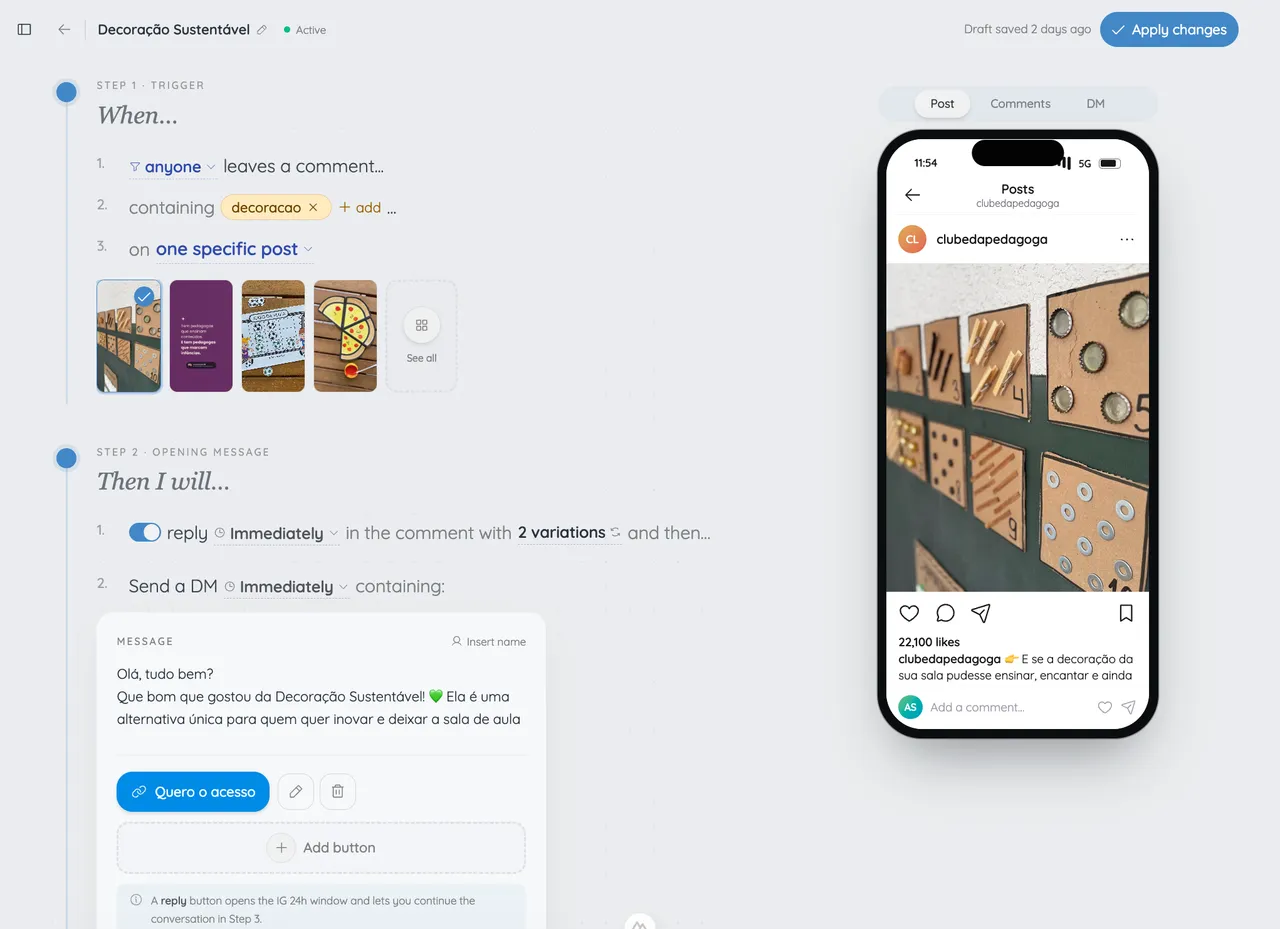
The real levios editor. This screenshot shows an example automation; customize the post, keyword and message for your own resource.
Connect your Instagram to levios
Create your account and complete authorization on Instagram. Choose the right professional profile and allow the requested access to comments and messages.
Choose the post and keyword
Select your post or Reel in the automation editor. For this example, use GUIDE and tell people in your caption that commenting will send the resource to their DMs.
Write the DM and add your link
Name the resource the person requested and add its access link. If you use an opening message before delivery, explain which button they need to tap to continue. An optional public reply can tell them to check their DMs.
Review the preview and run a test
Check the text in the phone preview. Activate the automation and comment GUIDE from a second account. Check DMs, message requests and the link destination. Also test a comment without the keyword.
Share your post and monitor delivery
Once your test works, promote the call to action. Monitor sends in levios. If you find a problem, pause the automation, correct the setup and test again before continuing.
Three messages to make your own.
Replace the fields in brackets before using them. Make sure the text matches what actually happens after the message.
If something does not work
- I saved, but reception does not reply.
- Save draft does not publish. Choose Save configuration, review and confirm activation. If Instagram confirmation is pending, use Check publication before editing again. Also check the connection and messaging permission.
- The greeting did not appear in my second test.
- Welcome messages respect the 24-hour or seven-day interval per person. A question or specific automation may also have answered first. Use the preview to test without sending real messages.
- The away message appeared at the wrong time.
- Review working days, hours and the account time zone. Check both preview scenarios and save your changes.
- Ice breakers do not appear in an old conversation.
- They appear before the first message. Check publication and test with an account that has not started the conversation.
Sources and review dates
Questions about automatic messages
Do I need an external page manager?
How many ice breakers can I create?
Are welcome and away messages sent together?
Can I include links in replies?
Does testing in the preview send a real message?
Does reception also reply to post comments?
Your DMs, ready to welcome people.
Prepare ice breakers, welcome replies and your away message in levios. Test the conversation in the preview and activate when ready.
Start FreeNo credit card required.